Your workouts, in text files you own.
Aski runs strength and rehab training on iPhone and Apple Watch. Let ChatGPT, Claude, or Gemini write your workouts — they come back as text files in your iCloud, ready to start.
No subscriptions, no accounts, no analytics — just big numbers, a loud rest timer, and the four metrics that matter.
Six screens, in order.
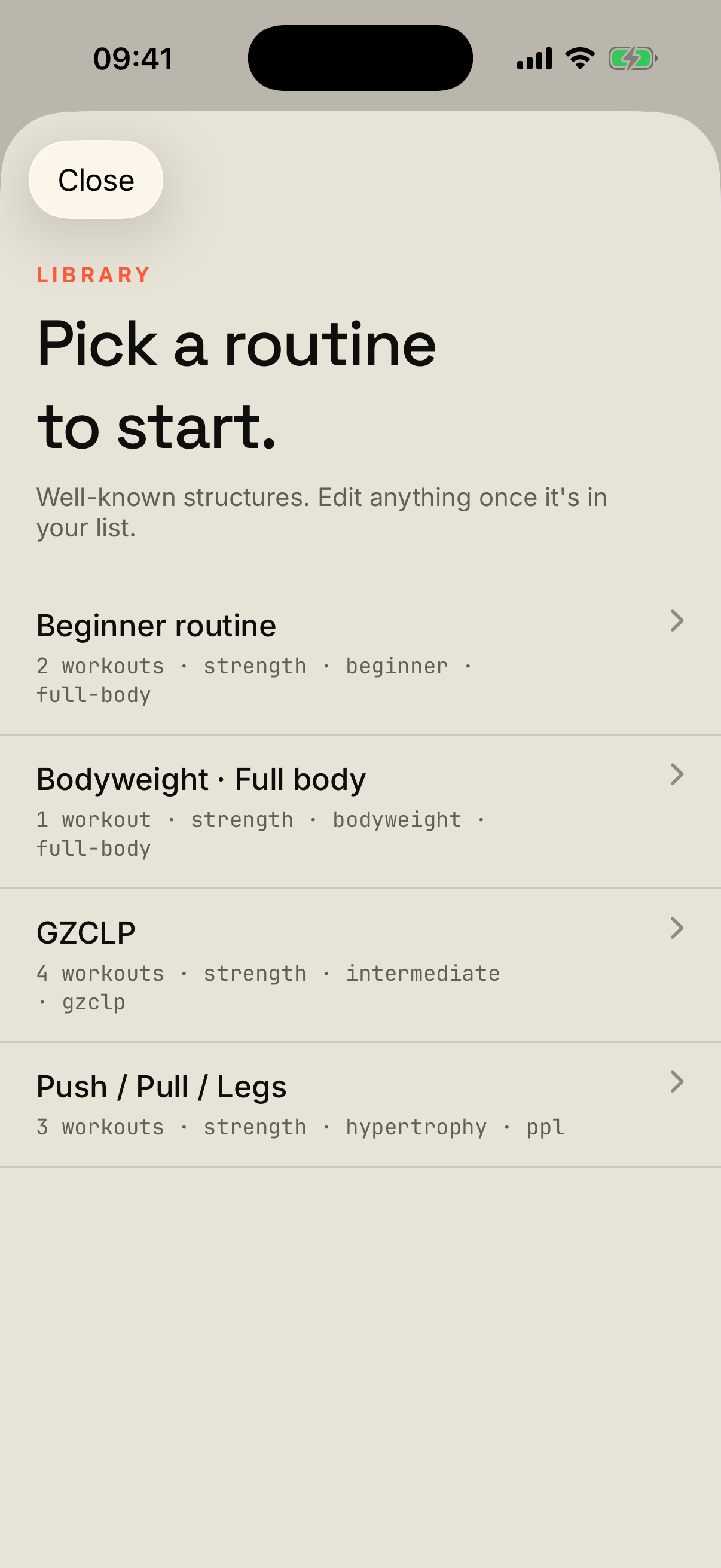
Start from a known structure — PPL, GZCLP, a beginner A/B. Add it, then edit anything once it’s yours.
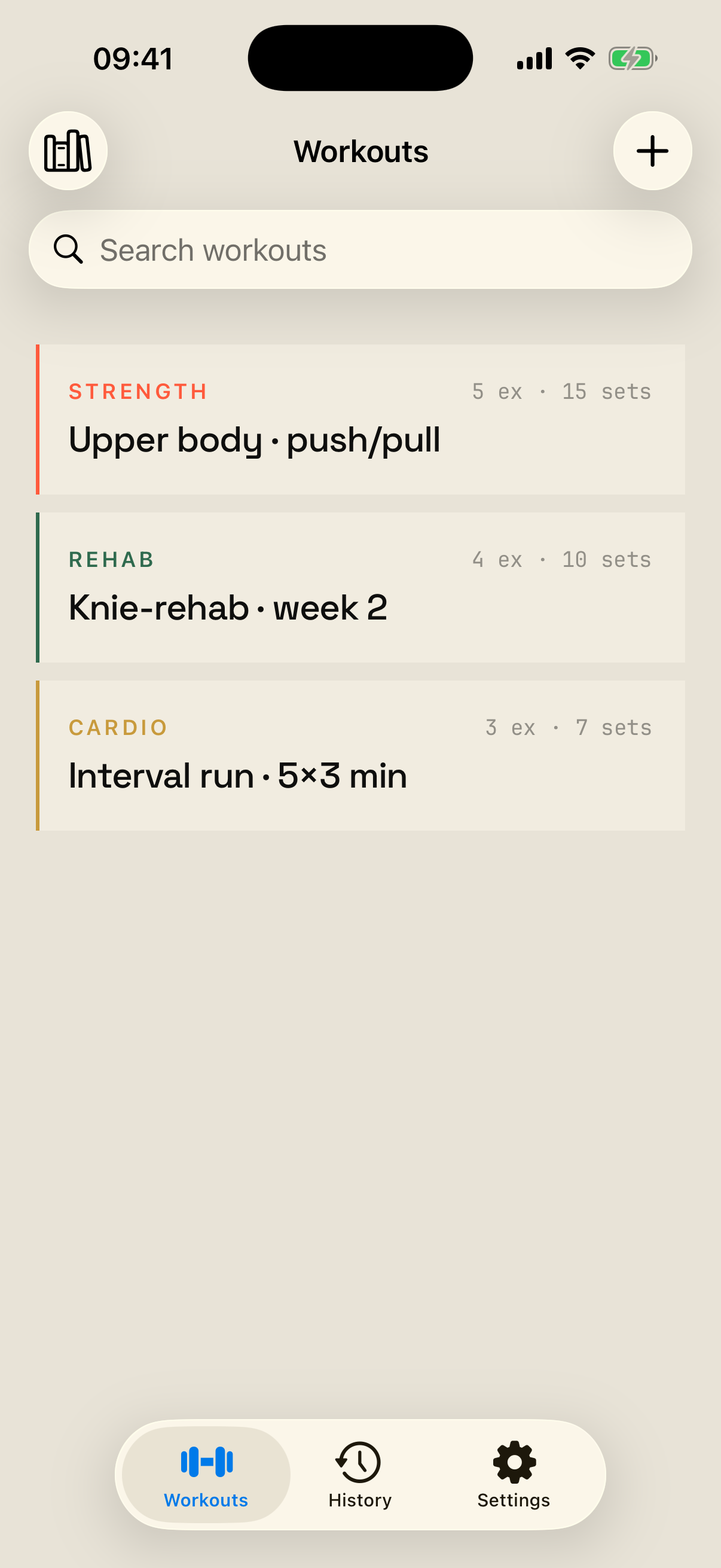
Every session in one list — the ones a chatbot wrote and the ones you kept. Tap one to start.
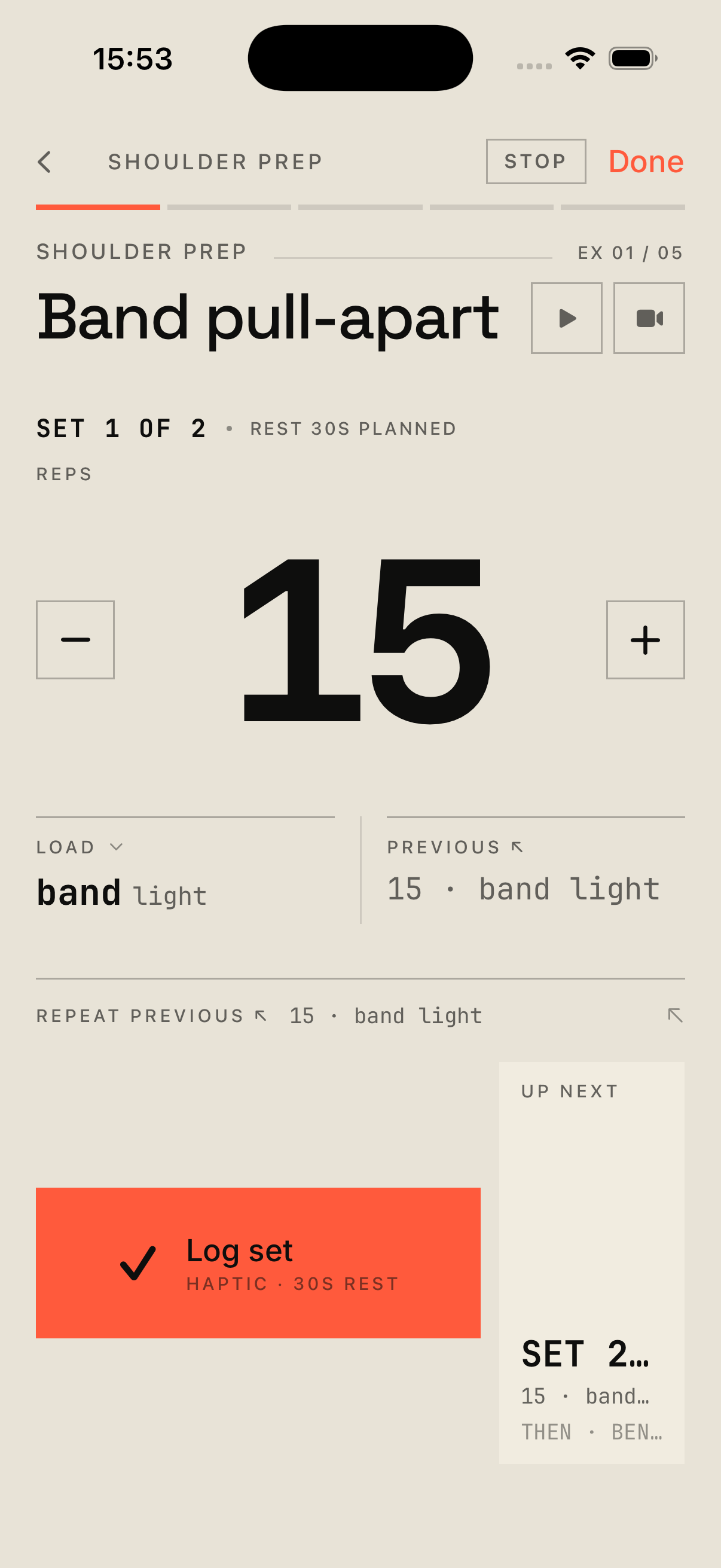
Big numbers, readable from across the room. Your last set sits above, the next pre-filled. One tap logs it.
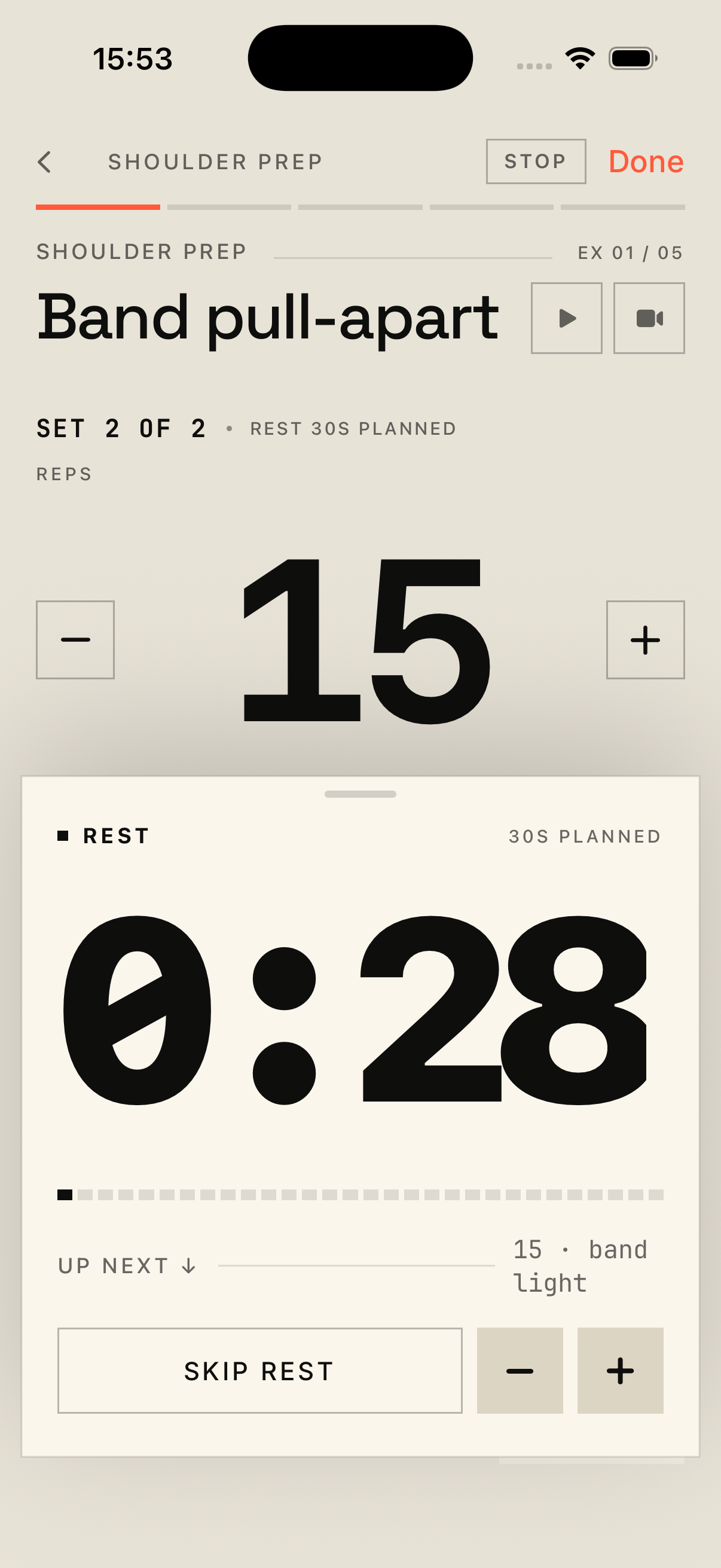
A tight coral countdown visible from six feet. Audible tick on the last ten, gong at zero.
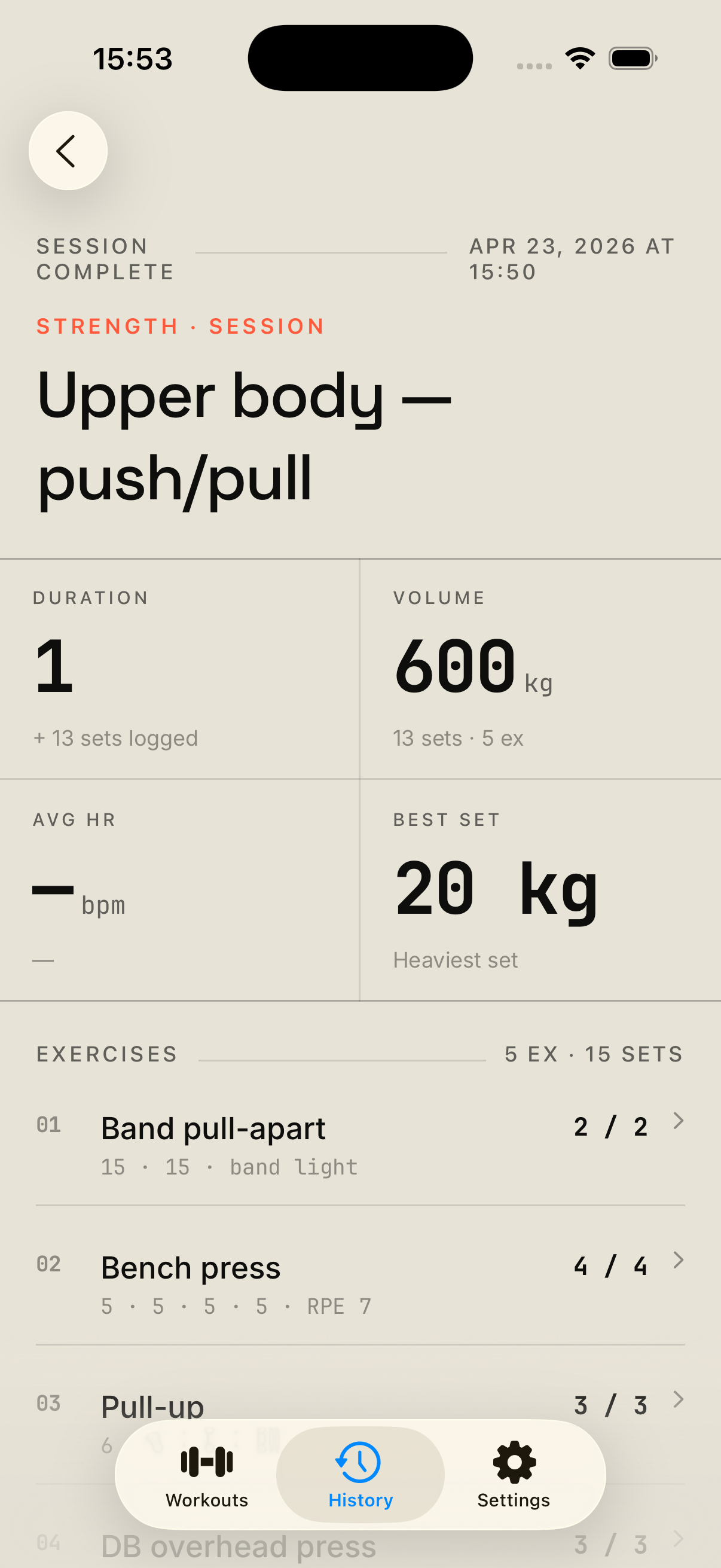
Time, sets, heart rate, volume — the four numbers that matter. No badges, no streaks.
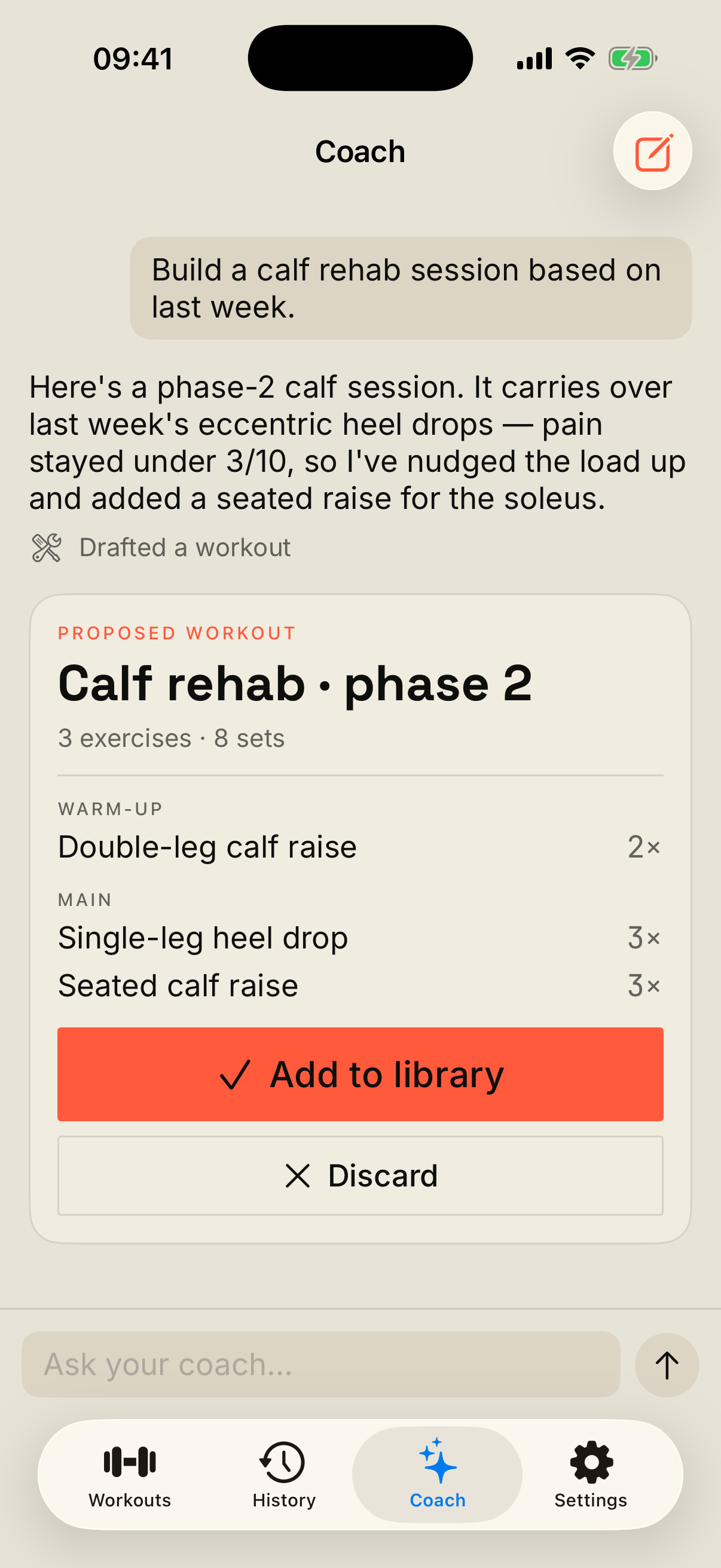
Add your own Claude key and the coach moves in-app — it drafts sessions you accept, never auto-saved.
- 01
Logging must never interrupt a set.
Tap the "previous" ghost. Tap the checkbox. Done. No modals, no confirmations, no four-step drawers between you and the next set.
- 02
The rest timer survives everything.
Live Activity on the Lock Screen, Dynamic Island pill, audible tick on the last 10 seconds, gong at zero. A silent notification with the phone 6 feet away is a failure.
- 03
The watch does what wrists do best.
Heart rate with zone colour. Session elapsed. Duration timers for timed exercises. Haptic feedback when a rest or duration timer ends. What the watch doesn’t do: log sets. The phone is already doing that, better.
- 04
Onboarding must not block the first set.
Every question is postponable. Strava, notifications, Watch setup — deferred to Settings until you actually need them. 90 seconds to the first logged rep.
- 05
Track, don’t coach.
No streaks, no badges, no leaderboards, no daily dopamine push. Aski records what you did; the coaching lives in your chatbot, where it belongs. The app’s job is the schedule and the receipt.
Everything stays on your device.
Workouts live in your iCloud Drive. HealthKit writes stay on the phone. Strava is a single opt-in, one-way upload — with tokens stored in Keychain and revokable any time.
Read the privacy policyLet any chatbot write your workouts.
The coach lives in your chatbot — Aski is the gym floor and the receipt. Paste the prompt, answer the interview, and your workouts come back as text files in your iCloud Drive. Portable, auditable, never locked to a subscription.
- 01 Copy the prompt below into any chatbot.
Claude, ChatGPT, or Gemini. The bot interviews you about goals, equipment, and injuries before writing anything.
- 02 The chatbot writes your workouts as JSON.
One file per workout — blocks, exercises, sets, weights, rest, supersets. Plain text you can read, audit, and version.
- 03 Aski picks them up automatically.
Save the files into iCloud Drive → Aski → workouts/, or paste the JSON straight into the app (Workouts tab → + → Paste JSON).
No app yet? Copy the whole prompt.
The block below is everything: the iCloud path, the workout
schema, and the interview instructions. Edit the
Goal: line, copy the whole thing, paste into Claude,
ChatGPT, or Gemini.
# Aski workout handoff

## Your job
You are helping me write workouts for Aski, an iOS strength-and-rehab training app I use solo. **Before you write any JSON, interview me.** Ask one question at a time, in plain language, and wait for each answer before moving on.

Cover at minimum:
1. Primary goal — strength, hypertrophy, rehab, general fitness
2. What I'm doing now — sessions per week, current weights
3. Experience level — lifts I know
4. Available days, session length, equipment / gym access
5. Injuries, things to avoid, current physio constraints
6. Anything I hate doing (so we skip it)

When you have enough, summarise the workouts you intend to build (how many, weekly shape, progression model) in plain English and ask me to confirm. **Only after I confirm** — emit the JSON.

## Where Aski stores workouts
- iCloud container: `iCloud.com.casvanderhoven.aski`
- Workout files live in: **iCloud Drive → Aski → `workouts/`**
  - Full Mac path: `~/Library/Mobile Documents/iCloud~com~casvanderhoven~aski/Documents/workouts/`
- Files are plain UTF-8 JSON. Filename convention: `<uuid>.json` matching the document's `id`.
- Aski auto-imports new `.json` files via NSMetadataQuery — no app restart needed.
- No iCloud access? I can also paste each JSON block directly into the app (Workouts tab → + → Paste JSON from clipboard).

## What I'm giving you (edit these lines before sending)
**Goal:** [e.g. hypertrophy upper body 3 days/week, or return-to-running rehab for my achilles]
**Experience:** [beginner / intermediate / advanced]
**Equipment:** [bodyweight / dumbbells / full gym / mix]
**Sessions per week:** [2 / 3 / 4 / 5]
**Anything I should know:** [injuries, time-of-day, equipment quirks]

## Output format
- After I confirm: emit one fenced ```json``` block per workout file, with the filename on a comment line above each block.
- After the JSON, briefly list the filenames I need to save and where.
- To revise a workout later, re-emit it with the **same `id`** and a **higher `version`** — Aski upserts on id. (Driving Aski through the MCP connector on a Mac instead? Then you don't touch `version` — `update_workout` bumps it for you.)

## Workout schema (save as `<uuid>.json` in `workouts/`)

```json
{
  "id": "UUID — keep stable across revisions of the same workout",
  "version": 1,
  "name": "Squat · heavy",
  "createdBy": "Claude (5/3/1-style)",
  "createdAt": "2026-05-04T09:00:00Z",
  "tags": ["lower", "strength"],
  "notes": "Focus on depth and bar speed.",
  "stravaActivityType": "WeightTraining",
  "blocks": [
    {
      "type": "warmup",
      "name": "Warm-up",
      "exercises": [
        {
          "exerciseId": "goblet-squat",
          "name": "Goblet Squat",
          "muscleGroups": ["quads", "glutes"],
          "coachNotes": "Slow eccentric. 2× through.",
          "sets": [
            { "reps": 8, "weight": { "type": "bodyweight" }, "rest": 60 }
          ]
        }
      ]
    },
    {
      "type": "main",
      "name": "Main work",
      "exercises": [
        {
          "exerciseId": "back-squat",
          "name": "Back Squat",
          "muscleGroups": ["quads", "glutes", "hamstrings"],
          "coachNotes": "Top set AMRAP.",
          "sets": [
            { "reps": 5, "weight": { "type": "mass", "value": 80, "unit": "kg" }, "rest": 180 },
            { "reps": 3, "weight": { "type": "mass", "value": 90, "unit": "kg" }, "rest": 180 },
            { "reps": 1, "weight": { "type": "mass", "value": 100, "unit": "kg" }, "rest": 240, "tempo": "3-1-1-0" }
          ]
        }
      ]
    }
  ]
}
```

### Naming the workout (`name` field)

I read these titles in a list, so the name has to tell me *which session this is* at a glance — keep it plain and literal, never hyped.

- **Shape:** `<Focus>` or `<Focus> · <qualifier>`. Lead with the defining content — body region, movement, or program (`Push`, `Lower body`, `Full body`, `PPL · Push`, `Achilles rehab`). Add a qualifier after a middot ` · ` *only* to tell sibling sessions apart: a letter (`· A` / `· B`), an intensity (`· heavy` / `· light` / `· volume`), or a phase (`· phase 2`).
- **Shared stem:** workouts in the same program share the leading part so the list reads as a set — `Push · A`, `Pull · A`, `Legs · A`.
- **One separator:** ` · ` (space, middot ·, space). Not `—`, `-`, or `/`.
- **Short:** aim for ≤ 32 characters — it has to fit a two-line list row and a one-line banner.
- **No fluff:** no motivational adjectives (Ultimate, Killer, Power, Beast…), emoji, or exclamation marks; no weekday names or dates (Aski timestamps the session); drop words every workout shares (Workout, Session, Training, Routine) unless the word *is* the qualifier (`· Workout A`).
- **Cardio / intervals:** name by the structure — `5×4 min @ FTP`, `8×400m @ 5K pace`, `Easy 40 min Z2`.
- **Rehab:** lead with the target joint — `Achilles rehab`, `Knee rehab · phase 2`.

Examples: `Push · A` · `Lower body · heavy` · `Full body` · `Achilles rehab · phase 2` · `5×4 min @ FTP`.

### Set variants

- **`{ "reps": N, ... }`** — `reps` (Int), optional `tempo` ("3-1-1-0" = eccentric-bottom-concentric-top), optional `weight` (structured object — see **Weight** below), optional `contraction` (`eccentric` / `concentric` / `isometric` — see below), optional `rest` (seconds).
- **`{ "durationSeconds": N, ... }`** — for holds and timed work. Optional `weight`, optional `rest`.

### Weight (set `weight`, optional)

Structured load — *how much*, not *with what*. Four shapes:

- `{ "type": "mass", "value": 80, "unit": "kg" }` — a number plus `unit` (`"kg"` or `"lbs"`).
- `{ "type": "bodyweight", "plusKg": 10 }` — bodyweight; `plusKg` (optional) adds external load, e.g. a weighted vest or dip belt.
- `{ "type": "band", "label": "red" }` — resistance band, free-text `label`.
- `{ "type": "other", "label": "sled + 20 kg" }` — anything else, free-text `label`.

Omit `weight` entirely for a "pick your own load" prescription — Aski lets me log what I actually used.

### contraction (reps sets, optional)

Default is a normal full rep. Set `contraction` when only part of the rep is the point — common in rehab:

- `"eccentric"` — lowering only (e.g. Achilles heel-drops).
- `"concentric"` — lifting only (partner or the other leg assists the lowering).
- `"isometric"` — a hold (usually paired with `durationSeconds` instead of `reps`).

Example: `{ "reps": 6, "weight": { "type": "mass", "value": 40, "unit": "kg" }, "contraction": "eccentric", "rest": 30 }`.

### WorkoutBlock.type

`"warmup"` | `"main"` | `"cooldown"`

### Supersets (optional, per exercise)

To pair exercises as a superset, give two (or more) adjacent exercises in the same block an identical `supersetId` (any string, e.g. `"ss1"`). Aski alternates rounds through the group with no rest between partners — A1 → B1 → rest → A2 → B2 → rest — and fires the full `rest` only after the round's last set. Omit the field for straight sets.

### stravaActivityType (workout-level, optional)

Aski uploads each finished session to Strava. Set the workout-level `stravaActivityType` to a Strava `sport_type` so the activity lands in the right bucket. Default for strength / rehab is `"WeightTraining"`; other common values: `"Run"`, `"Ride"`, `"Yoga"`, `"HighIntensityIntervalTraining"`, `"Swim"`, `"Hike"`, `"Walk"`. Unknown values fall back to tag-based inference. This is the primary Strava control — set it once per workout.

### stravaExerciseType (per-exercise, optional refinement)

For strength sessions Aski can also populate Strava's structured strength log (exercises × sets × reps × weight, with muscle maps). Layered on top of `stravaActivityType`, set a per-exercise `stravaExerciseType` to a token from Strava's exercise library so each movement maps exactly. Use the most specific token you're sure of; otherwise use the category's `*_GENERIC` value, or omit it — Aski then maps the exercise name heuristically.

Category generics: `BENCH_PRESS_GENERIC`, `CALF_RAISE_GENERIC`, `CARDIO_GENERIC`, `CARRY_GENERIC`, `CHOP_GENERIC`, `CORE_GENERIC`, `CURL_GENERIC`, `DEADLIFT_GENERIC`, `FLYE_GENERIC`, `HIP_RAISE_GENERIC`, `HIP_STABILITY_GENERIC`, `HIP_SWING_GENERIC`, `HYPEREXTENSION_GENERIC`, `LATERAL_RAISE_GENERIC`, `LEG_CURL_GENERIC`, `LEG_RAISE_GENERIC`, `LUNGE_GENERIC`, `OLYMPIC_LIFT_GENERIC`, `PLANK_GENERIC`, `PLYO_GENERIC`, `PULL_UP_GENERIC`, `PUSH_UP_GENERIC`, `ROW_GENERIC`, `SHOULDER_PRESS_GENERIC`, `SHOULDER_STABILITY_GENERIC`, `SHRUG_GENERIC`, `SIT_UP_GENERIC`, `SQUAT_GENERIC`, `TOTAL_BODY_GENERIC`, `TRICEPS_EXTENSION_GENERIC`, `WARM_UP_GENERIC`.

Common specific tokens follow the pattern `<EQUIPMENT>_<MOVEMENT>`: `BARBELL_BACK_SQUAT`, `DUMBBELL_BENCH_PRESS`, `GOBLET_SQUAT`, `BARBELL_DEADLIFT`, `ROMANIAN_DEADLIFTS`, `BARBELL_HIP_THRUST`, `GLUTE_BRIDGE`, `LAT_PULLDOWN`, `BENT_OVER_BARBELL_ROW`, `SIDE_PLANK`, `STANDING_CALF_RAISE`, `FLOATING_HEEL_DROP`, `WALL_SIT`, `KETTLEBELL_SWING`. The full list lives at developers.strava.com/docs/uploads — only emit tokens you've seen there.

### MuscleGroup (closed vocabulary)

`chest`, `upper-back`, `lats`, `lower-back`, `shoulders-front`, `shoulders-side`, `shoulders-rear`, `biceps`, `triceps`, `forearms`, `abs`, `obliques`, `glutes`, `quads`, `hamstrings`, `calves`, `hip-flexors`, `adductors`, `abductors`, `neck`. Unknown values are dropped on decode.

### Rehab tag

If I have an active injury, add `"rehab"` to the workout-template `tags` array. Aski activates a session-end pain gate + next-morning reactivity check for any session whose template is tagged `rehab`. Document stop / abort conditions in the template's `notes` field.
Prefer a formal JSON Schema for validation? The single-workout
template schema is also available as a downloadable
workout.schema.json
for tooling that needs a strict $schema reference.
On a Mac with Claude? Skip the copy-paste — let Claude drive Aski directly →
Or let Claude drive Aski directly.
Skip the copy-paste. A small local server wires Claude — Desktop or Code — straight into the same iCloud workout files the app already syncs. Claude reads and writes your workouts itself; anything it creates appears in the app automatically. Local only — no backend, no account, nothing leaves your Mac.
- List & read
Pull up every workout and read its full definition.
- Create & revise
Write a new session or rework an existing one — it lands in the app over iCloud.
- Know your training
Read recent sessions, weekly muscle volume, pain, and your exercise library.
- 01 Add it to Claude Desktop.
One file. Download it, double-click, and Claude Desktop installs the Aski extension — then restart Claude. No terminal, no JSON.
Add to Claude Desktop macOS · needs the Aski app installed with iCloud on. - 02 Open Claude and try it.
This opens Claude with a starter prompt ready to go. Press Enter and Claude calls the Aski tools — lists your workouts and drafts the next one from your history.
Open in Claude → Opens Claude Desktop if you have it, with the extension installed.
Prefer the CLI, or setting it up by hand?
Clone the repo and build the server first —
cd mcp && npm install && npm run build — then point Claude
at dist/index.js. Replace the placeholder path with your
own checkout. Full notes in the
mcp/ README.
claude mcp add aski -- node /path/to/Aski/mcp/dist/index.js{
"mcpServers": {
"aski": {
"command": "node",
"args": ["/path/to/Aski/mcp/dist/index.js"]
}
}
}